
Conquestador Casino Mobile App NZ – Android & iOS
The Conquestador casino app gives New Zealand players direct access to slots, live tables, and full account management from any phone or tablet. Whether you play for five minutes on the go or settle in for a longer session at home, the platform is built for fast loading, smooth navigation, and consistent performance across devices.
The mobile version covers everything the desktop site offers — games, promotions, deposits, and withdrawals — in a touch-optimized layout that works on both Android and iOS. NZ players can manage their account and access the full game catalogue without switching to a computer. Please play responsibly and within your personal limits.
Why Use the Mobile Version?
Conquestador mobile removes the need to open a full desktop browser every time you want to play. The game lobby loads quickly, active promotions appear on the home screen, and switching between casino sections and the cashier takes just a few taps — practical for both casual Kiwi players and those who play regularly.
- Instant access to slots, table games, and live casino titles including Blackjack, Roulette, and Baccarat.
- Fully touch-optimized layout for smartphones and tablets.
- Mobile cashier supports deposits and withdrawals, including NZD-friendly payment options.
- Active bonus offers and free spins are claimable directly from the mobile lobby.
How to Install on Android
The app for Android is distributed as an APK file from the official website — not through the Google Play Store. Installation takes under two minutes on a stable connection and does not require a Google account.
Step 1: Open the mobile site
Visit the official Conquestador website from your Android browser and locate the app download section. Starting from the official domain ensures you get the correct, unmodified version of the file.
Step 2: Start the download
Tap the Android download link to save the APK to your device. Before continuing, verify the file name and branding clearly match what you expect from the casino.
Step 3: Allow installation if needed
Android blocks APK installs from outside the Play Store by default. When prompted, go to your device settings, find your browser or file manager under “Install unknown apps,” and enable the permission only for that source — it does not affect other apps on your device.
Step 4: Launch and sign in
Open the installed Conquestador app, log in with your existing credentials, or register a new account from the mobile interface. The lobby, bonus section, and cashier are all accessible immediately after login.

How to Install on iPhone
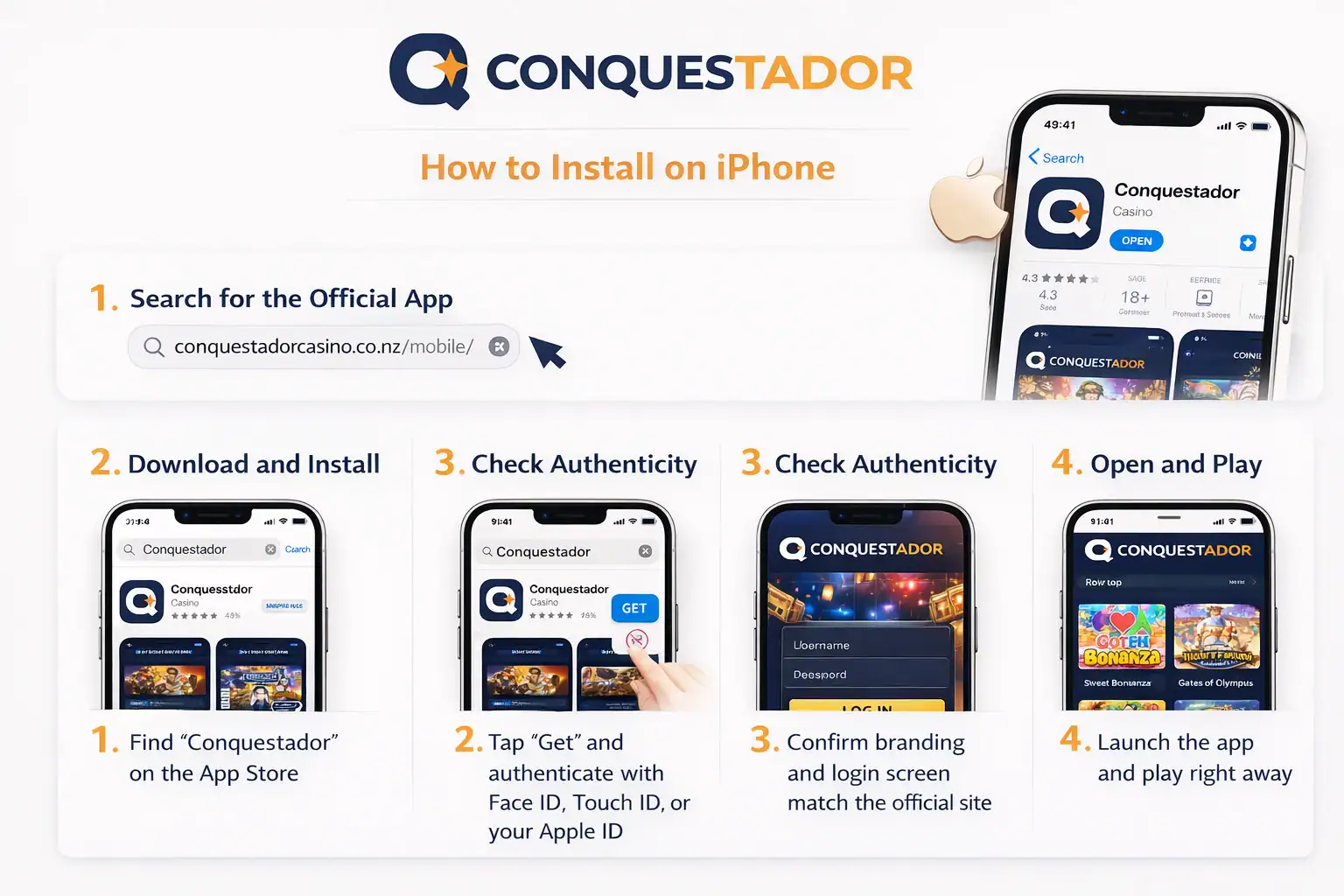
iPhone and iPad users can download the Conquestador casino app directly from the Apple App Store. The iOS version is reviewed by Apple, so no manual settings changes are needed on most devices in New Zealand.
Step 1: Search for the official app
Open the App Store and search for “Conquestador.” Check the publisher name and app icon against the official website before tapping install to avoid unofficial versions.
Step 2: Download and install
Tap “Get” and authenticate with Face ID, Touch ID, or your Apple ID. Installation completes in under a minute and the icon appears on your home screen automatically.
Step 3: Check authenticity
Before entering your account details, confirm that the branding, login screen, and layout match the official site. If anything looks off, delete the app and reinstall using the App Store link found on the official Conquestador page.
Step 4: Open and play
Sign in or register directly from the app. The full casino lobby — including popular slots and live dealer rooms — is available right after login. If the iOS app is unavailable in your region, the mobile Safari browser version is a solid alternative for New Zealand players.
App vs Browser: Which One to Use?
Both options give you access to the full Conquestador casino on mobile — but they behave differently in everyday use. The dedicated app suits players who open the casino regularly, while the browser version works well when you want quick access without installing anything. Here is how the two compare across the factors that actually matter.
| Feature | Conquestador App | Mobile Browser |
|---|---|---|
| Installation required | Yes — APK or App Store | No — open and play |
| Load speed | Faster — cached locally | Depends on connection |
| Full game catalogue | Yes | Yes |
| Deposits & withdrawals | Yes — full cashier | Yes — full cashier |
| Live casino support | Yes — optimized | Yes — browser dependent |
| Push notifications | Yes — bonus alerts | No |
| Home screen access | One tap from icon | Bookmark required |
| Storage used on device | Small — ~50–80 MB | None |
| iOS compatibility | App Store download | Safari — works well |
| Android compatibility | APK install | Chrome — works well |
| Best for | Regular players | Occasional sessions |
Choose the App if…
You play at Conquestador more than once a week, want instant one-tap access, or play live dealer games where connection stability and load speed make a noticeable difference.
Choose the Browser if…
You play occasionally, are on a shared or low-storage device, or want to try the platform before committing to a full install. Safari on iPhone and Chrome on Android both handle the mobile site well.
Security & Licensing
Before downloading the Conquestador casino app or entering account details on mobile, it is worth knowing what protects your data and what regulatory framework the platform operates under. Both points are straightforward — and both matter more than most players check.
SSL Encryption
All data transmitted between your device and Conquestador — including login credentials, payment details, and session activity — is protected by 128-bit SSL encryption. This is the same standard used by online banking and means your personal information cannot be intercepted in transit, whether you are on Wi-Fi or mobile data.
On the Conquestador mobile app, encryption runs automatically in the background. You do not need to configure anything — every session on Android or iOS is encrypted from the moment you open the app.
- 128-bit SSL on all connections
- Active on both the mobile app and browser version
- Applies to logins, deposits, withdrawals, and account changes
Licensed Platform
Conquestador operates under a valid gambling licence, which means the platform is subject to regulatory oversight covering fair play, responsible gambling tools, and the handling of player funds. Licensed casinos are required to maintain player account balances separately from operational funds — your balance is not at risk if the operator faces financial difficulty.
For New Zealand players, using a licensed platform means access to formal dispute resolution channels and enforceable responsible gaming features — including deposit limits, session reminders, and self-exclusion options available directly in your account settings.
- Regulated under a valid international gambling licence
- Player funds held separately from operational accounts
- Responsible gaming tools enforced at the platform level
Mobile Features
The Conquestador app is not simply a scaled-down desktop site. It is built around touch navigation, with large tap targets, horizontal game browsing, and a simplified menu that keeps the most-used sections reachable within one or two taps from anywhere in the interface.
| Feature | What It Means for Players |
|---|---|
| Full game lobby | Slots, live tables, jackpot games, and featured categories — all browsable from a single screen. |
| Touch-optimized controls | Large buttons and swipe navigation designed for fingers — comfortable on any screen size. |
| Mobile cashier | Deposit and withdraw in NZD without switching to desktop, with local payment method support. |
| Live bonus visibility | Current promotions, welcome offers, and free spin deals shown prominently in the mobile lobby. |
| Cross-device continuity | Balance, active bonuses, and game history sync automatically between mobile and desktop. |
Device Compatibility
The platform supports all major device types through a dedicated app and a browser-based fallback. You do not need a high-end device — performance is solid on mid-range smartphones and older tablets as long as the operating system and browser are reasonably current.
Desktop and laptop
Windows and macOS users access the full platform through Chrome, Firefox, Safari, or Edge. The desktop layout suits extended sessions and multi-table live casino play.
Smartphones
Android and iPhone users get the most direct route through the dedicated Conquestador app. Both versions include the full game lobby, cashier, and promotions section without needing a separate browser window.
Tablets
iPad and Android tablets deliver a noticeably better experience for live dealer games, where extra screen space improves visibility and comfort. The layout adjusts automatically to fit larger screens without distorting the interface.
Tips for Better Mobile Play
Most mobile performance issues come down to connection quality and device settings rather than the app itself. These habits make a real difference, especially during live casino sessions where a dropped connection can close an active table.
- Use Wi-Fi or a strong 4G/5G signal for live dealer games — even a brief drop can interrupt an active session.
- Keep the app updated to the latest version for security improvements and access to newly added titles.
- Review battery-saver settings before longer sessions — aggressive power modes can suspend apps mid-game.
- Mute notifications from other apps to avoid accidental taps during gameplay or live bets.
- Always log in and download through the official Conquestador channel to protect your account and personal data.
Mobile Experience Summary
The Conquestador casino app brings the full platform to your pocket — games, bonuses, and cashier tools in a layout built for everyday use. New Zealand players can deposit and withdraw in NZD directly through the mobile cashier without opening a desktop browser.
Whether you use Android or iPhone, the setup handles both through dedicated app versions backed by a browser fallback for any remaining devices. Gambling is entertainment — use the deposit limits and responsible gaming controls in your account settings to keep sessions enjoyable and within your comfort zone.
FAQ
Is there a Conquestador mobile app?
Yes. The Conquestador app is available for both Android and iOS. iPhone users download it from the Apple App Store; Android users install it via an APK file from the official website. The process takes under two minutes on either platform.
Can I use Conquestador on Android?
Yes. The Android version is distributed as an APK file from the official Conquestador website rather than the Google Play Store. Download the file, grant the browser install permission if prompted, and the app installs like any standard Android application.
Can I use Conquestador on iPhone?
Yes. The Conquestador casino app is listed on the Apple App Store. Search for “Conquestador,” verify the publisher details match the official site, and tap “Get” — no additional settings are required on most iPhones and iPads in New Zealand.
Does the mobile version include the same games as desktop?
The mobile lobby covers the full catalogue — slots, live casino tables, and jackpot titles including Book of Dead, Immortal Romance, and Mega Moolah. A small number of individual games may be unavailable on certain devices due to software provider restrictions.
Is the mobile version suitable for deposits and withdrawals?
Yes. The mobile cashier supports the full range of payment methods available on desktop, with NZD support and local payment options. There is no need to switch to a computer to manage your balance.


